Proposed free core
Calendar & scheduling
Appointments, availability, and your working day in one place.
A closer look at the real product, the free foundation, and the optional services around it.
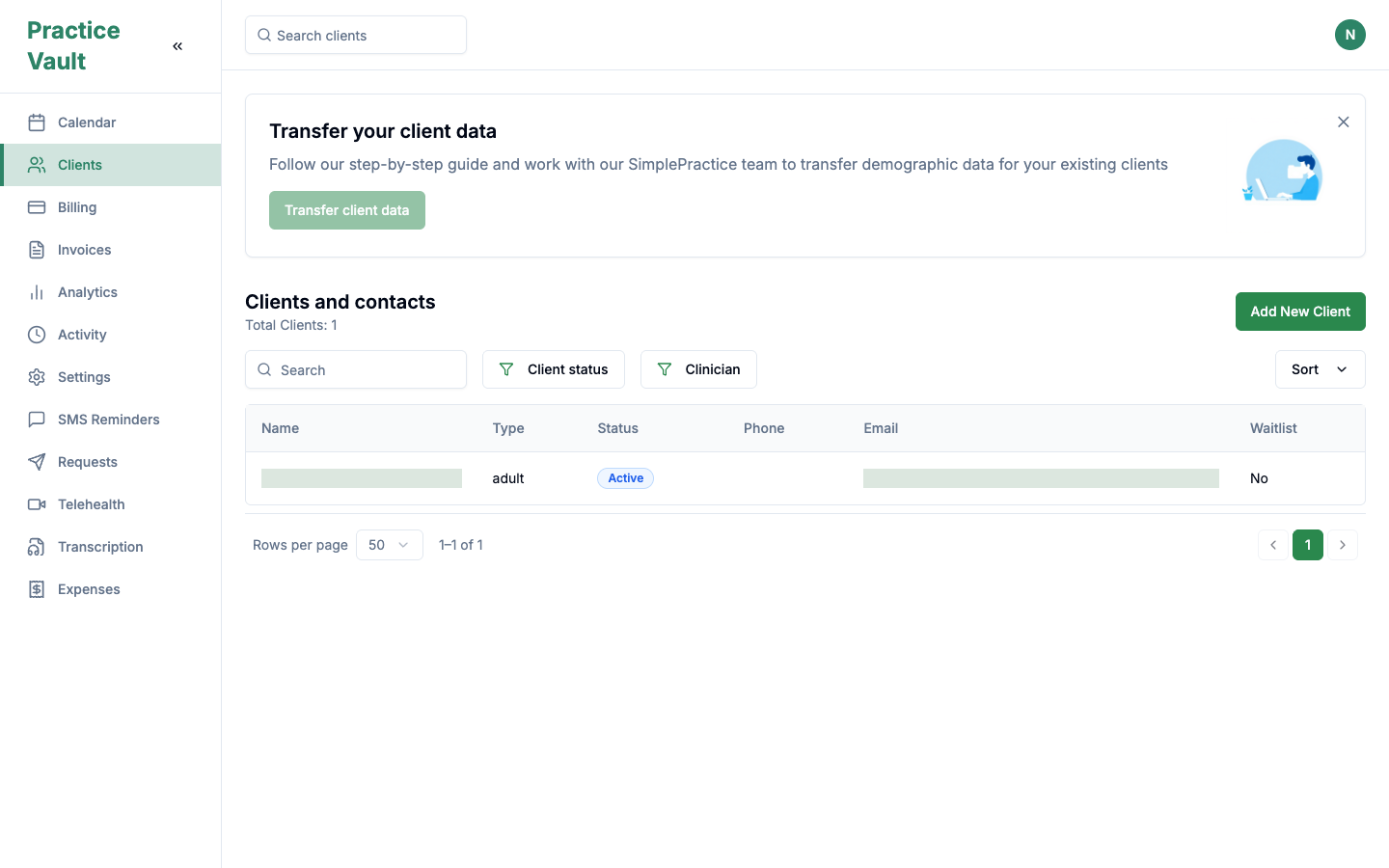
The real client directory, with search, status filters, and migration guidance.Real product interface with fictional demo data. No real clients or results are shown.
Proposed free-core coverage. The guide below separates observed screens from workflows still in testing or not verified.
Appointments, availability, and your working day in one place.
Contacts, demographics, history, and the details that matter.
Write notes, keep files, and use your own templates.
Track balances, create invoices, and export your records.
A place for clients, requests, and shared documents.
Understand attendance, income, and the cost of running your practice.
Keep sensitive information out of view with PHI auto-blur.
Real people help you move your records and get settled. Free.
| Area | Scope and current evidence | Proposed pricing |
|---|---|---|
| Client records & contacts | Adult, minor, couple and family records; demographics, contact preferences, statuses, waitlist, search and filters. | Free core |
| Calendar & availability | Day, week and month views, location and clinician filters, availability and appointment details. Scheduling needs further validation in the test build. | Free core · in testing |
| Notes & referral letters | Progress notes, separate psychotherapy-note areas, referral-letter fields, note history and appointment/billing links. | Free core |
| Files & document sharing | File uploads, document lists, consent/forms sharing and incomplete-document reminders. Normal email is included in the proposal; SMS delivery is metered. | Free core |
| Client portal & requests | Existing-client sign-in, intake/request flows, pending and archived queues, document status and client-facing pages. End-to-end booking is in testing. | Free core · in testing |
| Billing & invoices | Charges, balances, billing documents, monthly invoice workflows, filters and exports. Card processing fees remain with the processor. | Free core |
| Insurance & claims | Insurance policy records, payers, claim status views and ClaimMD connection controls. Live claims and eligibility are not verified; provider fees are separate. | Free UI · provider fees |
| Analytics & reporting | Income, outstanding balances, attendance, appointment status, client details, demographics, notes and report exports. | Free core |
| Expenses & receipts | Date, category, description, amount, receipt storage and export for your accountant. | Free core |
| Communication & reminders | Appointment reminder queue and sent history, notification preferences, and document reminders. In-app messaging needs further validation. | Free controls · paid SMS |
| Telehealth & translation | Multilingual session setup, participant links, translated chat and saved session views. Live media and speech processing require provider validation. | Usage-based services |
| Practice settings & privacy | PHI inactivity blur, settings, payment connection and plugin configuration. Team/location management still needs validation. | Free core · in testing |
Based on the September 4, 2026 test-environment inventory. UI observed means a screen, control or saved record was seen. In testing means a partial workflow or a recorded failure. Planned means proposed work with no release commitment. Not verified means there is insufficient evidence of support. A visible screen is not an end-to-end acceptance test.
Adult, minor, couple and family records. Client counts, search, sorting, pagination and status/clinician filters. Active, prospective and waitlist statuses.
Legal and preferred names, date of birth, address, sex, gender identity, relationship and employment status, race/ethnicity, preferred language, date first seen, group information, notes and custom fields.
Multiple email and phone records with type and permission controls. Preferences for upcoming appointments, incomplete documents and cancellations; a waitlist option during creation.
Overview, Billing, Measures, Files and Insurance tabs. Timeline, administrative notes, timestamps, billing codes and continued history loading. Edit, share, upload, activate, archive and delete controls.
Selectors are present, but incomplete team/location setup prevented full validation.
Day, week and month views, Today/date navigation, local time, clinician/location filters and status colours. Existing appointment records show duration, clinician, location, service, fee, billing type, totals and invoice state.
Availability views and appointment-limit controls were present. The calendar showed an invalid-license warning; slot clicks did not create appointments and Schedule appointment opened availability. A working booking and availability setup still needs validation.
Bidirectional external calendar synchronization was not visible in the audited build.
Waitlist records and an Active Groups intake category exist. Automatic cancellation-to-waitlist booking and group scheduling were not demonstrated; group appointments are excluded from current analytics.
Progress-note Save/Cancel controls, note history and separate psychotherapy-note areas. Referral letters have recipient name/specialty, diagnosis code/description, body and signing-clinician fields. Appointment notes link to billing and invoice state.
Manual notes and static/custom templates belong in the free-core proposal. A selectable SOAP, DAP, BIRP or narrative format library and a customizable clinical-template library were not found in the audit.
SOAP, DAP, BIRP, narrative and custom-format generation are proposed AI workflows. They require clinician review. Manual writing and template use are distinct from paid AI generation; saved generated notes remain available to open, edit and export when AI is off under the draft plan.
Transcription Records exposes recording controls, session metadata, live mode, language selection and optional appointment assignment. Successful voice processing and automatic note generation were not verified.
Upload, search, all-files view and action menus with name, type, status and update dates. The sharing flow selects a client, composes an email and reviews consent documents, scored measures, questionnaires or uploaded files. Existing portal access is shown.
The Measures tab and scored-measure sharing categories are visible. Questionnaire completion, scoring accuracy, repeated outcome tracking and outcome visualizations were not verified end to end.
Controls for automatic incomplete-document reminders before appointments and ad hoc email reminders. Normal transactional email is included in the free-core proposal; SMS delivery is metered separately. This audit did not establish successful delivery.
Existing Client and New Client entry points, practice contact/location details, a Video Office tile, email magic-link and Google sign-in options. Privacy, Terms, License Agreement, Help Center, Cookies and an emergency notice are present.
New-client navigation did not open a working booking flow. Earlier testing found a three-step request wizard with an empty Appointment Info step because services could not be configured. Service selection and appointment confirmation remain unverified.
Pending and archived queues; prospective clients, active groups, expiring items and complete/incomplete documents with counts. Status, location, document and request-type filters, Reset/Refresh, appointment details and date received.
The request queue was empty, so its actions were not tested. Inherited SimplePractice branding and legal/support links in the portal need correction before release.
Recent activity, session charges and billing documents with client links, date/invoice filters and CSV export. Document and client search, all-time filtering, delivery status/date and Export PDF controls.
The working billing/invoices page has search, month and type/status filters. Its monthly workflow groups completed sessions into one Verein invoice per organization and one family invoice per client, creates drafts and selects them for sending. Sending was not executed during the audit.
Client ledgers show fees, payments, balances, unallocated funds, unpaid invoices and write-off controls. Add Payment was disabled for the test client. The direct /invoices address returned 404, while /billing/invoices worked.
Stripe Account ID and Connect Stripe Account controls are visible. A live connection or patient payment was not tested; processor fees remain separate from free billing software.
Carrier, payer/ClaimMD payer ID, member and group IDs, policy holder and relationship, effective/expiry dates and primary-insurance flag. Payer search, add, active toggle and counts are present.
Search by client, claim or insurer; date filters; Draft, Submitted, Accepted, Rejected and Paid statuses. Submit Claim and Sync Claims controls were visible.
Clearinghouse settings rendered empty and payer data was not seeded. Live submissions, synchronization, eligibility queries and real-time insurance verification were not demonstrated. Actual claims, ERA, eligibility and fax services may have separate provider charges. Unlimited claims are not an established inclusion.
Insurance verification and pre-authorization appeared on the original roadmap. Automated pre-authorization is not verified and has no committed release date.
Month, last 30 days, last month, year and custom date filters. Projected income, income chart, payments, outstanding balances, unpaid invoices, uninvoiced appointments, notes and missing-note counts.
Income, Income Allocation, Outstanding Balances, Client Details, Client Demographics, Attendance and Appointment Status. Exposed reports include gross/net income, clinician payments, write-offs, balances, date/client/clinician/location filters and export controls.
Show, no-show, canceled, late-canceled and clinician-canceled breakdowns. Group appointment data is explicitly excluded. Deeper utilization forecasts, revenue trends and outcome visualization were not demonstrated.
Date, category, description and amount, with receipt upload and Save/Cancel controls. From/To date filters and Export to Excel for accounting.
AI receipt extraction and suggested expense categories are candidates. Manual expense entry and receipt storage are already visible; automated extraction is not verified.
The test account shows automatic reminders set for 24 hours before appointments, an Upcoming Queue, Sent Reminders history and Refresh. Visible settings/history do not establish live delivery.
Global and client Message controls did not open a composer during the audit. General conversations, formatting, message history and sending still need validation; saved translated session chat is a separate observed feature.
Configurable timing, multiple reminders, booking/change/cancellation messages, document and payment reminders, delivery receipts, failure/retry handling, two-way confirmations and rescheduling. Templates, merge fields, localization and encoded-segment preview are candidates too.
Prepaid balance, usage ledger, low-balance alerts and spend caps need product implementation. Opt-in records, STOP/HELP, suppression and quiet hours require validation before launch. Sender registration, dedicated numbers and replies depend on the destination and provider.
Session name, client and therapist/client language setup. Waiting/completed lists, timestamps, participants and Join/End/View/Delete controls. Selectors expose 100+ language/locale options, including German, English, Spanish and French; this does not establish language quality.
Saved English chat with Spanish translation, original text, speaker and timestamps. Duration, language pair, message totals, voice/chat counts, participant counts, join/leave times and speaker message counts are displayed.
Sandbox room controls include microphone/mute, participants, chat, language switching, connection status and transcript display. Join did not navigate in the audit, and prior microphone testing produced no speech-to-text output. Reliable live captions and translated speech still need validation.
The Video Office entry is visible, but working one-to-one telehealth and group telehealth were not demonstrated. The tested /telehealth address returned 404; this does not establish the state of every nested route. Included group video or unlimited live media is not confirmed; provider usage may cost separately.
Admin email/password form, password visibility, forgot-password link, account identity, Profile/Settings/Log out and help/legal links. Navigation also includes Activity; a separate activity workflow was not audited.
Automatic inactivity blur, enable/disable, timeout, blur intensity, activity detection and Ctrl+Shift+B quick toggle. Screen blurring alone does not establish security or compliance.
Per-practice capability slots include Split Billing with two plugins and Default Billing marked active. Stripe connection controls exist; operational behavior remains to be validated.
Profile, practice, team and services/products routes returned 404; billing settings remained on Loading and clearinghouse settings were empty. Team permissions, multi-location administration and Scheduling and inquiries, Documentation and Client notifications settings were not verified.
The older site discussed HIPAA, HITRUST, enterprise hosting, encryption at rest/in transit, data ownership, no training on patient data and clear AI labels. Backup and recovery, retention and full-record export scope, MFA, role-based access control (RBAC) and audit logging also require evidence review. This UI audit does not establish implementation of these controls or verify EU/Austrian billing, hosting and compliance readiness. Refer to the Trust page for the current evidence review and confirm scope and terms with the team.
Exports are described by their observed controls, not as a verified full-record migration format. Review privacy and security evidence ↗
5 recorded audio hours, 100 bounded text assists and $3 SMS credit per clinician each month. Extra recorded audio is $0.03 per minute; extra text assists are $0.1 each. Live voice and live interpretation are excluded from this allowance and minute rate.
Draft plan, with no monthly allowance rollover. One text assist allows up to 8,000 input and 2,000 output tokens, including reasoning tokens; larger work needs separate usage limits. Read the usage terms. The eight families below describe testing and planned work. A subscription does not mean every listed workflow is available. Clinical output always needs clinician review.
Turn recorded session audio into a transcript you can review.
Follow a conversation across languages, with original text alongside translations. Live voice processing requires separate pricing and validation.
Create a first draft in SOAP, DAP, BIRP, or your own format.
Pull out topics, agreed actions, and follow-up items.
Organize clinician-defined goals and interventions into a working plan.
Draft referral letters and client-friendly messages for your review.
Bring the important details from forms and documents together.
Find relevant details in a client record, with links back to the source.
These are possible directions from our 52-candidate planning catalog. Except for the evidence stated below, they are not verified implementations. This is not a promised release list, an included-feature guarantee or a delivery schedule. Candidates may change or never ship.
Recorded transcription and live captions have UI evidence but unverified processing. Further candidates: post-session dictation, speaker diarization with corrections/timestamps, vocabulary support, transcript cleanup and audio-linked highlights. Participant labels alone do not prove diarization.
Saved bilingual chat is observed; live speech translation is in testing. Candidates: translating notes, letters, forms and instructions; plain-language rewriting; spoken interpretation/text-to-speech; a multilingual client assistant. Spoken services would need separate usage terms.
SOAP, DAP and BIRP drafts, custom-template generation, rewriting/shortening/grammar/tone, structured field extraction, completeness checks, draft comparisons against clinician edits and de-identification suggestions. Identifier removal would require human checking.
Session summaries and action items, pre-session briefs, longitudinal progress timelines, treatment-review/handover/discharge summaries and approved client-friendly recaps.
Goals from clinician objectives, plan structure and review dates, clinician-selected intervention descriptions, homework/worksheets, psychoeducation and visit-preparation handouts, and outcome-measure narrative summaries. Manual measure scoring belongs in free core; its implementation still needs validation.
Referral, progress and discharge letters, administrative confirmations, appointment follow-ups, document requests, personalized/translated reminders, staff-reviewed FAQ answers, billing explanations and payment reminders. Delivery costs are separate from drafting.
Questionnaire summaries, uploaded-document OCR and extraction, referral parsing and field suggestions, conflicting/missing information flags, receipt extraction and expense categories, consent/document classification and suggested filing.
Authorized-record search with source citations, record Q&A, billing-code suggestions, claim completeness checks and denial explanations, natural-language reports, waitlist matching and scheduling suggestions, no-show/utilization forecasts, an internal product-help assistant and a voice receptionist/after-hours booking assistant. Voice reception would be a separate service, with its own limits and pricing.
Generated material needs review and source checking. Treatment selection, diagnosis and crisis decisions stay with qualified people. Messages need an authorized sending workflow. Live interpretation, voice reception, video and clearinghouse services need separate pricing and limits.
These subjects appeared on our earlier website. Their status here reflects the available evidence; none has a committed release date.
Suggestions from session type and duration for clinician or biller review. Automated coding, fewer rejections and reimbursement outcomes are not verified.
Suggested appointment times based on availability patterns. This original idea goes beyond the visible calendar and has not been demonstrated.
Organize recurring themes and mood patterns in notes, with outcome measurement tracking and visualization for clinician interpretation. These analyses were not verified.
The original roadmap started multilingual support with Spanish. Saved English/Spanish chat is observed; a validated Spanish-first clinical rollout remains unconfirmed.
Voice-to-text session summaries and treatment-plan suggestions remain proposed, with clinician review. Insurance verification and pre-authorization are covered in the insurance guide.
Insurance verification and pre-authorization remain planned and unverified. The policy and claim screens are covered in the insurance guide.
Keep the core at $0. Optional AI usage costs $0.03 per recorded audio minute and $0.1 per bounded text assist. Live voice and live interpretation are excluded from this rate. SMS is $0.03 per outbound US segment or $0.15 per outbound Austrian segment. AI Plus is optional; pay-as-you-go usage has no included monthly allowance. Read the usage terms.
These are proposed commercial terms. Paid workflows, usage metering and billing still need product validation. Generated notes, transcripts and saved records remain accessible when paid AI is off under this proposal.
Prices are per outbound segment, based on the recipient’s country. Longer messages and Unicode can use multiple segments. Sender setup, dedicated numbers, registration, campaign fees and replies are separate and need a quote. Other destinations need a quote too.
AI Plus includes $3 SMS credit per clinician per month. That covers 100 US segments OR 20 Austrian segments. Mixed destinations draw from the same $3 balance, not separate country allowances. Unused monthly credit does not roll over under the draft plan.
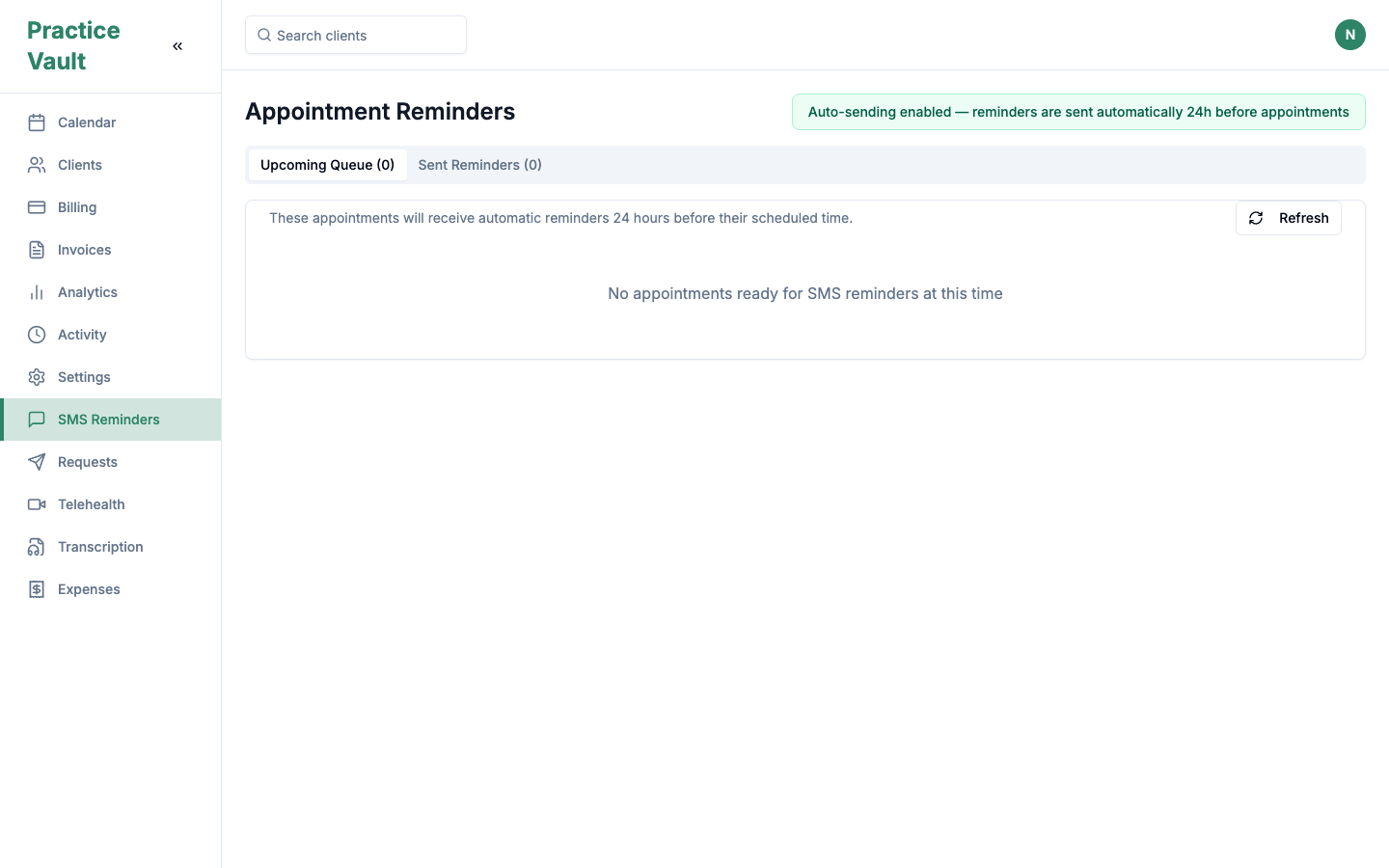
Actual reminder interface. Prepaid balance, two-way confirmations and spend limits are proposed product work, not features added by this website redesign.
Estimate SMS costsKeep the foundation free. Choose pay-as-you-go AI and SMS, or AI Plus with $3 monthly SMS credit per clinician. SMS beyond that credit is metered at the destination rate.
Plan records, roles, locations, migration, and paid usage together. Ask us to validate your team workflow before moving.
One clinician, 200 one-segment US reminders a month. Standard monthly USD prices, before tax. PracticeVault totals exclude sender, number, registration, campaign and reply fees; there is no flat sender-fee estimate.
| Monthly cost | PracticeVault proposal | SimplePractice Essential | Jane Practice |
|---|---|---|---|
| Core subscription | $0 | $79 | $79 |
| 200 US SMS segments before credit | $6 | Included | Included, supported regions |
| Core + SMS, without AI | $6 | $79 | $79 |
| Optional monthly AI plan | $19 AI Plus | $35 Note Taker | $15 AI Scribe |
| SMS credit with AI Plus | $3 applied to SMS | SMS included | SMS included |
| SMS after AI Plus credit | $3 | SMS included | SMS included |
| AI plan + 200 US SMS segments | $22 | $114 | $94 |
PracticeVault core + SMS: $6 for $6 total. AI Plus + SMS: $19 + $6 − $3 credit = $22. The Plus example stays within 5 recorded audio hours and 100 assists, so it has no AI overage. Additional recorded audio/text usage and provider services add to the bill. Live voice is excluded.
This is a price example, not a claim of feature parity or guaranteed savings. AI capabilities, allowances and supported regions differ. Higher usage can make our proposal more expensive. Jane also includes data import, onboarding and support. The US reminder comparison does not establish Austrian SMS support at either competitor.
Official sources retained from the September 7, 2026 pricing research: SimplePractice pricing ↗ · Jane pricing ↗
Explore the full comparison ↗White-glove migration remains free in the proposal. A guided SimplePractice transfer entry point was observed; import mapping, full transfer results and migration status tracking were not verified. Arrange the scope and validate your records with the team before moving.
Direct founder support remains available through Contact. Response-time or service-level guarantees have not been established here. The older lifetime price-lock guarantee is not a confirmed term of this draft plan.
Earlier claims of included AI notes, unlimited insurance claims, included group telehealth and real-time insurance verification are covered above with their current evidence and pricing boundaries. Privacy and security evidence and our AI policy provide further context.
An integration, a specific workflow, a requirement your practice can’t compromise on. We want to hear it.
Share your feedback ↗